

Summarize this blog post with: ChatGPT | Perplexity | Claude | Grok
You already know that building a habit is easier when you can see what you’re doing consistently, but tracking several daily habits gets messy without a simple system. In this guide, you’ll learn how to create a habit tracker from scratch, with practical options for notebooks, spreadsheets, Notion, Canva, your phone, and other popular tools.
Key Takeaways
- A habit tracker is a simple system for recording whether you complete specific habits over time.
- Effective habit trackers can be created with a notebook, spreadsheet, template, notes app, design tool, or dedicated app.
- Creating a habit tracker means choosing specific habits, defining completion criteria, selecting a format, and recording progress consistently.
- A monthly habit tracker organizes daily habits in a calendar or table, which makes patterns and missed days easier to see.
- Notion, Google Sheets, Excel, Canva, Numbers, OneNote, Obsidian, and iPhone apps can all host a habit tracker.
- Tracking fewer, clearly defined habits is easier to maintain than an overly complicated system.
- Regular reviews keep your tracker useful as routines and goals change.
Table of Contents
What Is a Habit Tracker and How Does It Work?

A habit tracker is a tool or system that records whether specific habits are completed over a defined period, such as a day, week, or month. It works by turning a vague intention into a visible record. For example, a “read 10 pages” habit becomes a row in a table, and you mark each day you finish it.
Habit trackers come in several common formats: calendars, checklists, tables, notebooks, spreadsheets, printable templates, and apps. They all do the same basic job. This matters because about 43% of the behaviors people reported were performed almost daily in the same context, according to a widely cited study on everyday habits. A tracker helps you notice which of your behaviors are already automatic and which still need attention.
For background on how routines form, read our guide to habit formation and our Atomic Habits summary. For a full overview, see our habit building guide.
Why Is Habit Tracking Useful for Building Routines?
Habit tracking is useful because it makes behavior visible, shows your consistency, and helps you spot patterns. A meta-analysis of 138 studies with 19,951 participants found that monitoring goal progress promoted goal attainment, and the benefit was larger when people physically recorded their progress or reported it publicly. Tracking doesn’t guarantee success, but it gives you better information to work with.
In addition, a tracker makes review easy. For example, you might notice you skip workouts every Thursday, which tells you to move the session rather than blame yourself. Habits also take time. In one study of 96 people, forming a new habit took an average of about 66 days, with wide individual variation. Because the timeline varies so much, a tracker works best as a long-term record rather than a 30-day sprint.
To go deeper, read our guide on how to build better habits.
How Do You Create a Habit Tracker From Scratch?
Creating a habit tracker involves choosing the habits you want to monitor, defining what counts as completion, selecting a tracking format, and recording your progress consistently. The process has eight steps:
- Choose your habits. Pick one to three to start, such as drink water or walk daily.
- Define completion. Be exact: “walk 20 minutes” beats “exercise more.”
- Pick a tracking period. Weekly suits beginners; monthly shows longer patterns.
- Select a format. Use paper, a spreadsheet, or an app.
- Build the grid. Put habits in rows and dates in columns.
- Add a completion marker. Use a checkmark, dot, or yes/no value.
- Review regularly. Check your tracker once a week.
- Adjust. Drop or shrink habits that are too hard or no longer relevant.
What Should You Include in a Habit Tracker?
A habit tracker should include habit names, dates, a consistent completion marker, and optionally a notes column. For example, a note like “low energy, shortened to 10 minutes” helps you learn from missed days later. Keep the layout small enough to read at a glance.
How Many Habits Should You Track at Once?
You should track one to three habits at once when you’re starting out. Tracking too many makes the tracker feel like a chore. For example, I once tracked six habits at the same time and started falling behind by week two, so I dropped two. Begin with water, a 10-minute walk, and journaling, then add more once these feel routine.
How Do You Create a Habit Tracker in Different Tools?
You can create a habit tracker in Notion, Google Sheets, Excel, Canva, Numbers, OneNote, Obsidian, on an iPhone, or in a paper notebook. The right choice is the one you’ll open daily. Each tool below includes a short mini-tutorial.
How Do You Create a Habit Tracker in Notion?
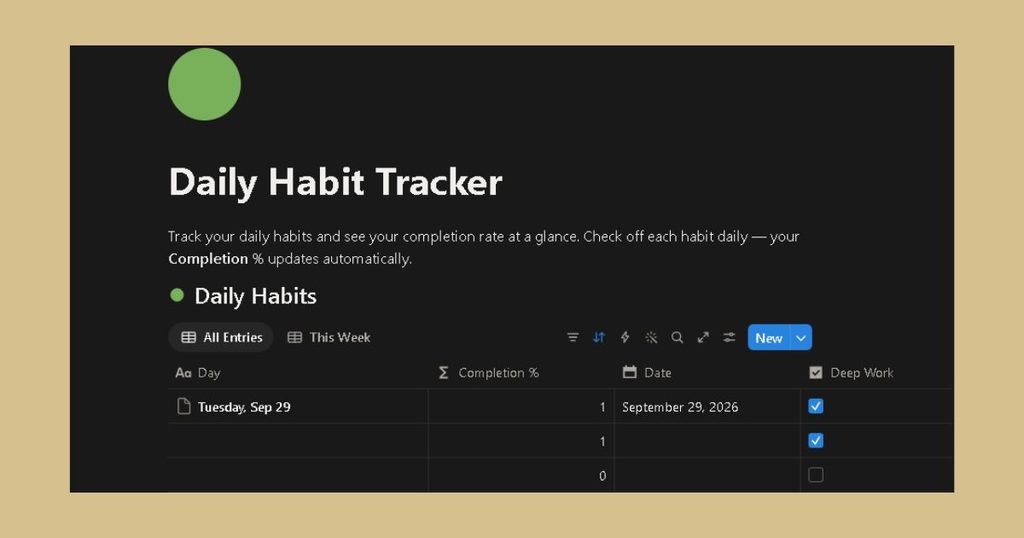
To build a Notion habit tracker, create a database table with a date column and a checkbox property for each habit. Then add a calendar or board view if you want a more visual layout.
[Insert image: Notion database with checkbox columns for three habits | Alt text: “Create a habit tracker in Notion with checkbox properties”]
How Do You Create a Habit Tracker in Google Sheets?
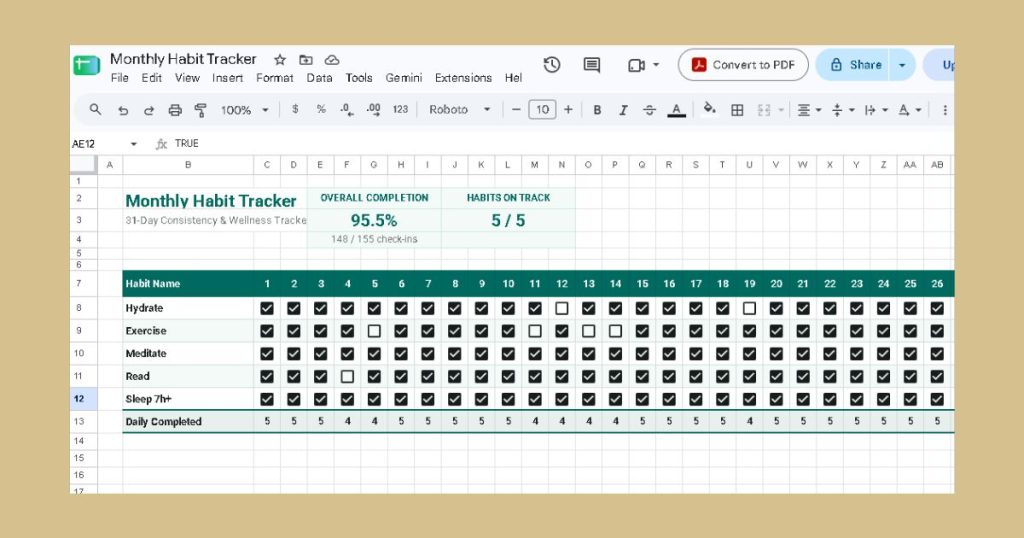
In Google Sheets, list habits down column A and dates across row 1. Then select the grid and choose Insert > Checkbox. Add conditional formatting to turn checked cells green. This is a free option that syncs across devices.
[Insert image: Google Sheets grid with checkboxes and green formatting | Alt text: “Build a habit tracker in Google Sheets with checkboxes”]
How Do You Create a Habit Tracker in Excel?
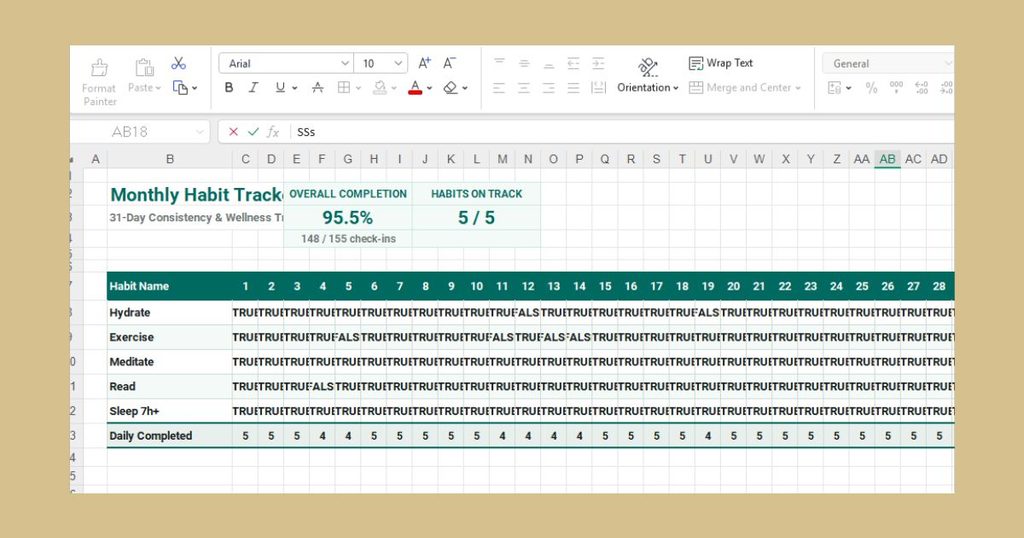
In Excel, set up the same grid, then mark completion with an “x” or “1.” Use =COUNTIF(B2:AF2,"x") to total each habit’s completed days, and add a column for the completion percentage. Excel and Google Sheets are the formats that have worked best for me. They’re easy to reach, and I’ve used Excel for years, so there’s no learning curve to get in the way of the habit itself.
[Insert image: your own Excel tracker with COUNTIF totals | Alt text: “Make a habit tracker in Excel with COUNTIF formulas”]
How Do You Create a Habit Tracker on Canva?
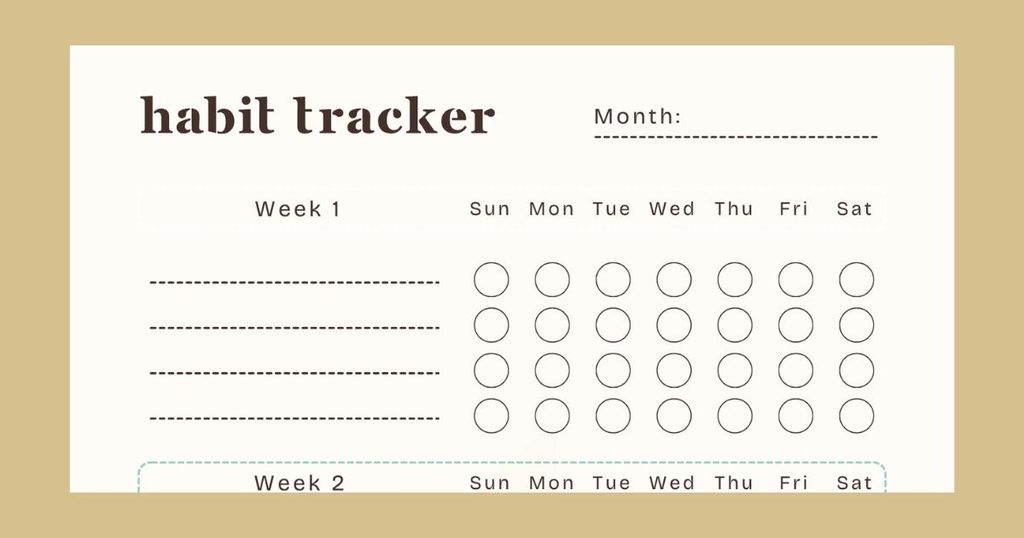
On Canva, search for a habit tracker template, or insert a table element and edit the rows and columns. Canva is best for printable habit trackers that you fill in by hand.
[Insert image: Canva table customized as a monthly tracker | Alt text: “Design a printable habit tracker on Canva”]
How Do You Create a Habit Tracker on iPhone?
On an iPhone, you can use the Notes app to make a table, or the Reminders app to set recurring daily tasks you check off. Both are free and already installed, so there’s nothing to download.
[Insert image: iPhone Notes table with habit rows | Alt text: “Create a habit tracker on iPhone using the Notes app”]
How Do You Create a Habit Tracker in Obsidian?
In Obsidian, add a daily note template with checklist lines such as - [ ] Walk. You can then review your notes by date. Community plugins can add tracker views if you want charts.
[Insert image: Obsidian daily note with checklist | Alt text: “Set up a habit tracker in Obsidian with daily notes”]
How Do You Create a Habit Tracker in Numbers?
In Numbers, insert a table, add habits as rows and dates as columns, then format the body cells as checkboxes. A simple SUM formula adds up completed days.
[Insert image: Numbers table with checkbox cells | Alt text: “Build a habit tracker in Numbers with checkbox cells”]
How Do You Create a Habit Tracker in OneNote?
In OneNote, insert a table on a page, type your habits in the first column, and use the “To Do” tag or a typed “x” to mark each day. OneNote works well if you already keep your notes there.
[Insert image: OneNote page with habit table | Alt text: “Create a habit tracker in OneNote with a simple table”]
How Do You Make a Habit Tracker in a Notebook?
To make a habit tracker in a notebook, draw a grid with habits down the left side and the days of the month across the top. Use a ruler and a pen you like. A notebook has no notifications or distractions, so it suits the times when you switch your devices off.
How Do You Create a Simple Habit Tracker Template?
A simple habit tracker uses a table with habits on one axis, dates on the other, and a checkmark or other consistent marker to record completed habits. A weekly habit tracker template looks like this:
| Habit | Mon | Tue | Wed | Thu | Fri | Sat | Sun | Notes |
|---|---|---|---|---|---|---|---|---|
| Drink 8 glasses of water | ✓ | ✓ | ✓ | ✓ | ✓ | Forgot Wed | ||
| Walk 20 minutes | ✓ | ✓ | ✓ | ✓ | Rainy Tue | |||
| Read 10 pages | ✓ | ✓ | ✓ | ✓ | ✓ |
How Do You Create a Monthly Habit Tracker?
To create a monthly habit tracker, extend the same grid to 28-31 columns. For example, a monthly habit tracker in Google Sheets can total each row’s checkmarks, so you see your completion rate at a glance. To adapt it, swap in your own habits and delete any column you never use.
[Insert image: custom diagram of a weekly template expanding into a monthly grid | Alt text: “Illustrate a monthly habit tracker layout from a weekly template”]
What Are the Best Habits to Track?
The best habits to track are specific, realistic, and meaningful to your current goals. A “100 habits to track” list is useful for inspiration, but only a few belong in your tracker. Browse these categories and pick one or two:
- Health: drink water, sleep by 11 p.m., eat vegetables
- Fitness: stretch, walk 8,000 steps, do a strength session
- Productivity: plan tomorrow, do a deep work block, clear your inbox. See our guide on how to stop procrastinating.
- Learning: read 10 pages, practice a language, watch one lesson
- Finances: log expenses, skip impulse purchases, transfer to savings
- Self-care: journal, meditate, take a screen-free hour
- Personal development: write a gratitude note, wake up early, review goals
For more inspiration, explore our daily routine ideas, our morning routine guide, and our list of self-improvement habits. To connect habits to bigger ambitions, use our goal-setting guide.
Should You Use a Habit Tracker App or a Paper Tracker?
Whether you should use an app or paper depends on which one you’ll actually update, and no format wins universally. The main options compare like this:
| Option | Simplicity | Customization | Accessibility | Automation | Ease of Review |
|---|---|---|---|---|---|
| Paper notebook | High | High | Needs carrying | None | Moderate |
| Spreadsheet | Moderate | Very high | Any device | Formulas | High |
| Digital template | High | Moderate | Any device | Low | Moderate |
| Habit tracker app | High | Moderate | Phone always on hand | Reminders, streaks | High |
For example, a student who is always on their phone might choose an app, while a writer who enjoys planning on paper might prefer a notebook. Paper and digital can also work together. I’ve used a notebook tracker for the times I switch my devices off, and I’ve built trackers in Notion and Canva too. For daily use, though, I keep coming back to a spreadsheet because it’s quick to update and shows my totals instantly.
If you want productivity tips to pair with a digital tracker, start small. Free options such as Google Sheets, Apple Notes, and OneNote cover most beginners’ needs.
What Should You Do When You Miss a Day on Your Habit Tracker?
When you miss a day, leave it blank and continue the next day. One gap doesn’t erase your progress, but a longer gap can. For example, I tracked my reading for two weeks and found myself picking up a book without thinking about it. When I skipped tracking in week three, my reading dropped from about 10 pages a day to about 5, so I went back to tracking.
A common rule of thumb is to avoid missing twice in a row. Treating a miss as information, not failure, is a core part of building self-discipline strategies that last.
What’s Next: How Do You Start Tracking and Review Your Progress?
To start, choose one to three habits, create your tracker today, and review it after one week. Your first-week action plan has five steps:
- Today: Pick your habits and define completion.
- Today: Build the tracker in the format you prefer.
- This week: Record every day, even briefly.
- Day 7: Review. Which habits were easy? Which were skipped?
- Next week: Adjust or simplify.
A tracker should get easier to use over time, not more complicated.
Conclusion
An effective habit tracker doesn’t need to be elaborate. It should be simple enough to update regularly and flexible enough to change when your habits, schedule, or goals change. Choose a format you’ll actually use, start with a small number of clearly defined habits, and build from there. For books that can help, see our roundup of the best self-improvement books. Create your tracker today and mark your first checkmark.
Written by Kat Theo, Content Creator, Writer, and Founder of Psychology of Success. Kat translates complex psychological principles into actionable daily habits, drawing on her own journey through personal growth and professional hurdles to share real-world strategies on mindset, peak performance, and self-mastery.
Reviewed by Kat Theo, Founder of Psychology of Success. Kat started as a content creator on Facebook and Instagram, sharing personal development reels on her Psychology of Success page, and recommends books and resources that have worked for her.
Disclaimer: This article was initially drafted using AI assistance. However, the content has undergone thorough revisions, editing, and fact-checking by human editors and subject matter experts to ensure accuracy.